
Nawigacja – paginacja
Długie treści na stronach od zawsze były problemem. Z jednej strony chcielibyśmy umieścić na stronie serwisu całą jego zawartość, z drugiej strony scrollowanie treści przez kilka ekranów nie zawsze jest dobrym rozwiązaniem. Wyjątek stanowią blogi, gdzie użytkownicy są przyzwyczajeni do posługiwania się pionowym suwakiem przeglądarki. Jednak nie blogi będą stanowić dzisiejszy temat. Chciałbym napisać troszeczkę o dobrych przykładach radzenia sobie z długimi treściami w obrębie serwisu.
Długi content (treść) występuje najczęściej w przypadku list wyszukiwania, gdzie na stronie należy zaprezentować listę znalezionych wyników. W większości przypadków nie mówimy tutaj o wynikach na długość dwóch lub trzech ekranów, ale o treści mogącej zająć nawet kilkunastokrotną długość widocznej przestrzeni okna przeglądarki.
Innym przykładem miejsca, gdzie prezentowana jest długa treść, są wszelkiego rodzaju strony z nowościami, produktami (aplikacje e-commerce) czy przeglądem pewnych zbiorów (pliki do pobrania, listy pluginów itp.).
Rozwiązaniem stosowanym w praktyce (i chyba jednym z lepszych) jest wykorzystanie silników dzielących (porcjujących) nam dane na kilka-, kilkanaście stron oraz wyświetlających nam je pojedynczo – tzw. paginacja. Do kolejnych stron (porcji informacji) przechodzimy najczęściej za pomocą paska nawigacyjnego, zawierającego odnośniki (linki) do kolejnych stron.
Rozwiązań jest wiele. Jedne są lepsze inne gorsze – jak to w praktyce bywa. Poniżej zaprezentuję Wam te najciekawsze z punktu widzenia sposobu ich implementacji i organizacji.
Google jest pierwszym przykładem jaki chciałbym przytoczyć. Większość z nas zna zapewne statndardowy pasek nawigacujny na stronach z wynikami wyszukiwania w wyszukiwarce Google.

Równoległa lista linków, kolejno ponumerowanych. Numer strony aktualnie przeglądanej jest wyróżniony innym kolorem i nieklikalny. Wszystko byłoby poprawnie, gdyby nie niski kontrast między kolorami elementów klikalnych i nieklikalnych. Linki posiadają podkreślenie, co symbolizuje możliwość ich kliknięcia i jest to dobre rozwiązanie. Do kolejnych stron możemy przejść poprzez kliknięcie jednego z linków numerycznych lub przez wyróżniony napis „Następna”.

Zapewne zauważyliście, że nie ma możliwości tutaj szybkich skoków po 10, 20 itd. stron, co jest ewidentną wadą tego mechanizmu. Dodarkowo obszar klikalny każdej ze stron jest bardzo mały (podobnie jak i odległość między nimi), co dodatkowo utrudnia nawigację. Widać to szczególnie w przypadku liczby stron większej od 20. Należy tutaj jeszcze wspomnieć o braku możliwości przejścia do pierwszej i ostatniej strony, co może być mało przyjemne na długi listach wyników.

Ostatnia strona (podobnie jak pierwsza) posiada tylko jeden wyróżniony link (Poprzednia).
Dodatkowym minusem rozwiązania prezentowanego przez Google jest niewykorzystanie etykiet testowych linków (title). Nie omieszkam wytknąć tuaj rozpraszającego graficznego napisu „Goooooooogle”, który tak naprawdę do rozwiązania nie wnosi nic oprócz kolejnej dawki chaosu i zacierania przejrzystości interfejsu.
Mozilla
Mozilla zaproponowała na stronie dodatków do swojej przeglądarki Firefox dosyć ciekawe rozwiązanie, które w porównaniu z Google, jest o wiele lepsze (choć i ono nie ustrzegło się błędów).



Jak widać na powyższych rysunkach, Mozilla zadbała o zdrowie i wzrok użytkownika i oprócz kontrastowej nawigacji, zadbała o dużą przestrzeń między kolejnymi linkami oraz duże klikalne pole, które notabene podświetlają się po najechaniu kursorem, co dodatkowo wpływa pozytywnie na percepcję i postrzeganie tego, co wykonujemy. Na minus jednak wciąż należy zaliczyć brak możliwości szybkich skoków (po kilkanaście wyników na przód i w tył) oraz brak wykorzystania tekstowych opisów linków, podobnie jak to miało miejsce w przypadku Google.
Inne rozwiązania
Ciekawym rozwiązaniem jest przykład zaproponowany na stronie pewnego blogu.
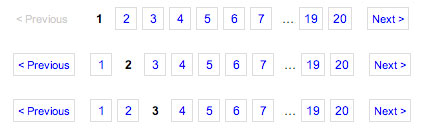
Do złudzenia przypomina ono rozwiązanie Mozilli, jednak różni się kilkoma drobnymi szczegółami i zachowaniami w zależności od ilości wyników. Po szerszy opis działania i komentarz do wszystkich przypadków zapraszam na stronę z artykułem. Brakuje mi w tym rozwiązaniu podobnych rzeczy jakie nie zostały wykorzystanie przez Mozillę, jednak jest ono bliskie ideału i z drobnymi poprawkami z powodzeniem można by je stosować w praktyce.
Moim zdaniem dobry silnik do paginacji powinien spełniać poniższe zalecenia:
- przejrzystość i stosowana odległość między elementami
- elementy aktywne jak i nieaktywne powinny być wyraźnie zaznaczone
- obszar klikalności elementów powinien być w miarę duży
- użytkownik powinien mieć możliwość przejścia w każdym momencie do pierwszej i ostatniej strony wyników
- użytkownik powinien mieć możliwość szybkich skoków (0 5, 10 czy 20 elementów) w obu kierunkach na długich listach wyników
- elementy zbędne w nawigacji powinny być niewyświetlane
- linki powinny posiadać opisy title mające na celu ułatwienie nawigacji dla osób posługujących się screendreaderami
- linki powinny posiadać podkreślenie, co pozytywnie wpływa na ich postrzeganie przez percepcję użytkownika
- rozpiętość i dostępna jednorazowo lista linków do stron powinna być dopasowana do liczby wyników – optymalną liczbą jest 3-5 wyników w przód i w tył
Nie udało mi się jednak znaleźć takiej implementacji. Może Wy ją znacie?
Dodano 16 czerwca 2008:
Jednak udało się znaleźć (dzięki blogowi Marcina Szuby) wspaniały przykład jak nie należy projektować paginacji.
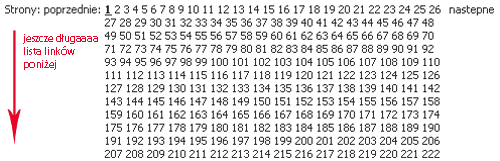
Przykład znajduje się tutaj.
Dodano 24 czerwca 2008:
O powyższej tematyce traktuje także poniższy artykuł, chociaż nie ze wszystkimi stwierdzeniami się zgadzam:
Dodano 23 sierpnia 2008:
Kolejny artykuł (bardziej jako ciekawostka i mini tutorial) traktujący o tematyce stronicowania:
- keyword:
- nawigacja interfejs paginacja pager stronicowanie projektowanie rozwiązania
Two thoughts on “Nawigacja – paginacja”
Ciekawy wpis.
Polecam również mój wpis na temat SERP http://inuse.wordpress.com/2007/10/30/biblioteka-elementow-interfejsu-uzytkownika-czesc-pierwsza/
oraz galerię paginacji na http://www.smashingmagazine.com/2007/11/16/pagination-gallery-examples-and-good-practices/
Superb post, incredibly valuable. I’m wondering the reason why the opposite professionals with this field do not recognize this.